
Debounce and throttle limit how often your code runs. Web Workers move the work to a completely different thread so the main thread never has to stop for it at all. This guide covers why the UI freezes, how Workers fix it, how to communicate with them, and how to use Comlink to make the whole thing feel like a regular async function call.
⚡ Quick Answer
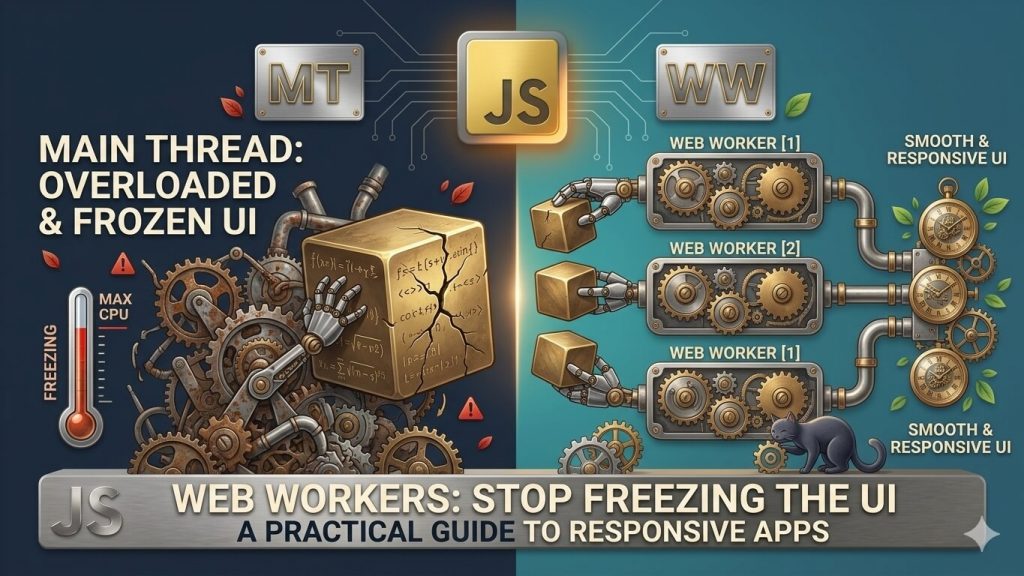
A Web Worker runs JavaScript in a background thread, completely separate from the main thread. Because it runs independently, heavy computations — sorting large datasets, parsing CSV files, image processing — no longer block the UI. The main thread and the worker talk by passing messages with postMessage(). Use Comlink to wrap that message-passing in a clean async API that feels like calling a regular function.
📋 Table of Contents
- Why Does JavaScript Freeze the UI?
- What Is a Web Worker?
- Live Demo — Frozen vs Smooth
- Building a Basic Worker with postMessage
- Comlink — The Right Way to Use Workers in 2026
- Transferable Objects — Zero-Copy Data Transfer
- React — A Custom Hook for Worker Lifecycle
- Setting Up Workers in Vite and Modern Bundlers
- When to Use a Worker (and When Not To)
- What Workers Cannot Do
- FAQ
Why Does JavaScript Freeze the UI?
JavaScript on the main thread is single-threaded. That one thread is responsible for everything: running your JavaScript, responding to user events, calculating layout, and painting frames to the screen. These tasks share the same queue, and they run one at a time.
When you run a heavy computation — sorting 200,000 rows, parsing a 10 MB CSV, running a search filter across a large dataset — your JavaScript occupies the thread completely until it finishes. No frames can paint. No click events can fire. The page appears frozen.
What Is a Web Worker?
A Web Worker is a JavaScript file that runs in a separate OS thread. It has its own global scope — self instead of window — its own event loop, and its own memory. It cannot access the DOM, but it can run any CPU-intensive JavaScript you throw at it without touching the main thread.
Think of a restaurant kitchen. The main thread is the waiter — taking orders, serving tables, keeping customers happy. The Web Worker is the chef working in the back — doing the heavy cooking work. The waiter doesn’t cook; the chef doesn’t serve tables. They communicate through the pass: the waiter sends an order (postMessage), the chef cooks it, and passes the finished dish back (another postMessage). Neither gets in the other’s way.
await won’t help — the thread is still blocked during the computation. Web Workers move the computation to a completely separate thread so the main thread is physically freed.Live Demo — Frozen vs Smooth
Click both buttons and watch the bouncing ball. The “Without Worker” button runs a heavy prime-number search on the main thread — you’ll see the ball freeze and the counter stop. The “With Worker” button runs the same computation in a Web Worker — the ball keeps bouncing and the counter keeps incrementing throughout.
Both compute the 8,000th prime number. One freezes the ball. One doesn’t.
Building a Basic Worker with postMessage
A Web Worker is just a separate JavaScript file. You create it from the main thread, send it a message, and listen for a message back.
// worker.js runs in its own thread.
// 'self' is the worker's global scope (not window).

// Heavy computation: find the Nth prime number
function findNthPrime(n) {
  let count = 0, num = 1;
  while (count < n) {
    num++;
    if (isPrime(num)) count++;
  }
  return num;
}

function isPrime(n) {
  if (n < 2) return false;
  for (let i = 2; i <= Math.sqrt(n); i++) {
    if (n % i === 0) return false;
  }
  return true;
}

// Listen for messages from the main thread
self.onmessage = function (event) {
  const { n } = event.data;
  const result = findNthPrime(n);

  // Send the result back to the main thread
  self.postMessage({ result });
};
// Create the worker — pass the path to the worker file
const worker = new Worker('worker.js');
// Listen for results coming back from the worker
worker.onmessage = function (event) {
const { result } = event.data;
document.getElementById('output').textContent = result;
};
// Send data to the worker to start the computation
worker.postMessage({ n: 800000 });
// Terminate the worker when done to free resources
// worker.terminate();Comlink — The Right Way to Use Workers in 2026
Comlink is a 1.1kB library from Google that wraps the postMessage / event model and lets you call worker functions as if they were regular async functions. No message routing, no switch statements, no manual error handling.
npm install comlinkimport * as Comlink from 'comlink';
// Expose a plain object — Comlink wraps it so each method
// can be called from the main thread as an async function.
const api = {
async findNthPrime(n) {
let count = 0, num = 1;
while (count < n) {
num++;
if (isPrime(num)) count++;
}
return num;
},
async sortLargeArray(arr) {
return [...arr].sort((a, b) => a - b);
},
async parseCSV(csvText) {
return csvText.trim().split('\n').map(row => row.split(','));
}
};
function isPrime(n) {
if (n < 2) return false;
for (let i = 2; i <= Math.sqrt(n); i++)
if (n % i === 0) return false;
return true;
}
// Expose the api object to the main thread
Comlink.expose(api);import * as Comlink from 'comlink';
// Create the worker and wrap it with Comlink
const worker = new Worker(
new URL('./heavy.worker.js', import.meta.url),
{ type: 'module' }
);
const api = Comlink.wrap(worker);
// Now just call worker functions like regular async functions —
// no postMessage, no event listeners, no switch statements.
const prime = await api.findNthPrime(8000);
console.log(`The 8000th prime is ${prime}`);
const sorted = await api.sortLargeArray(hugeArray);
const rows = await api.parseCSV(csvText);new URL('./heavy.worker.js', import.meta.url) — this is the modern bundler-aware pattern for loading workers. Vite, webpack 5, and Rollup all recognise this syntax and automatically bundle the worker file separately. It replaces the old new Worker('/worker.js') string path that bypassed the bundler and required manually placing the file in a public directory.Transferable Objects — Zero-Copy Data Transfer
By default, data passed to a worker is deep-copied using the structured clone algorithm. For small objects this is fine. For large binary data — a 50 MB image buffer, a large typed array — copying can take hundreds of milliseconds on its own, defeating the purpose of using a worker.
Transferable objects solve this with a zero-copy transfer. Instead of copying the data, ownership of the buffer is moved to the worker — the operation is nearly instant regardless of data size. The trade-off: the original buffer becomes unusable after transfer.
const buffer = new ArrayBuffer(50 * 1024 * 1024); // 50 MB

// ❌ Copy — structured clone: buffer is duplicated, ~180ms for 50MB
worker.postMessage({ buffer });

// ✅ Transfer — zero-copy: ownership moves to worker, nearly instant.
//   buffer is now unusable on the main thread after this call.
worker.postMessage({ buffer }, [buffer]);
//                                  ↑
//   Second argument: array of transferable objects to transfer (not copy)

// In the worker: receive and use normally
self.onmessage = ({ data }) => {
  const view = new Uint8Array(data.buffer); // full access, no copy
  // process view...
};ArrayBuffer, MessagePort, ReadableStream, WritableStream, TransformStream, ImageBitmap, and OffscreenCanvas. Plain objects, arrays, strings, and numbers cannot be transferred — they are always copied. For large binary data (image pixels, audio samples, file contents), always transfer rather than copy.React — A Custom Hook for Worker Lifecycle
In React, you need to create the worker once, keep it alive across renders, and terminate it when the component unmounts. A custom hook handles all of this cleanly.
import { useEffect, useRef, useState, useCallback } from 'react';
import * as Comlink from 'comlink';

/**
 * Creates a Web Worker backed by Comlink and cleans it up on unmount.
 * Returns a stable async function that can be called from event handlers.
 */
export function useWorker<T>(workerUrl: URL) {
  const workerRef = useRef<Worker | null>(null);
  const apiRef    = useRef<Comlink.Remote<T> | null>(null);

  useEffect(() => {
    // Create the worker and wrap it — once, on mount
    workerRef.current = new Worker(workerUrl, { type: 'module' });
    apiRef.current    = Comlink.wrap<T>(workerRef.current);

    return () => {
      // Terminate cleanly on unmount — releases the OS thread
      workerRef.current?.terminate();
    };
  }, []); // empty dep array: only runs once

  return apiRef;
}

// Usage inside a component
function DataProcessor() {
  const [result, setResult] = useState<number | null>(null);
  const [loading, setLoading] = useState(false);

  const workerApi = useWorker(
    new URL('./heavy.worker.js', import.meta.url)
  );

  const handleRun = useCallback(async () => {
    if (!workerApi.current) return;
    setLoading(true);

    // Feels like a local async call — Comlink handles the rest
    const prime = await workerApi.current.findNthPrime(10000);
    setResult(prime);
    setLoading(false);
  }, []);

  return (
    <div>
      <button onClick={handleRun} disabled={loading}>
        {loading ? 'Computing...' : 'Find 10,000th prime'}
      </button>
      {result && <p>Result: {result}</p>}
    </div>
  );
}
Setting Up Workers in Vite and Modern Bundlers
Modern bundlers handle Web Workers natively — no plugins required. The new URL() syntax is the standard recognised pattern.
// ✅ Modern pattern — bundler-aware, handles imports inside the worker
const worker = new Worker(
  new URL('./heavy.worker.js', import.meta.url),
  { type: 'module' } // enables ES module syntax inside the worker file
);

// ❌ Old pattern — bypasses bundler, requires manually managing the worker file
//   in your public/ directory with no import support
// const worker = new Worker('/worker.js');type: 'module', the worker file can use import statements normally — including importing npm packages like Comlink or lodash. This is supported in all major browsers as of 2026 and is the standard way to write worker files in modern projects. The older importScripts() pattern still works but is no longer recommended for new code.When to Use a Worker (and When Not To)
| Situation | Worker? | Why |
|---|---|---|
| Sorting / filtering a 100k+ row dataset | ✓ Yes | Blocks the main thread for hundreds of ms without a worker |
| Parsing a large CSV or JSON file | ✓ Yes | String processing is CPU-bound and freezes the UI |
| Image processing (resize, filter, compress) | ✓ Yes | Pixel manipulation is exactly what workers are for |
| Running a search index (Fuse.js, MiniSearch) | ✓ Yes | Keeps search fast without blocking keystrokes |
| Encryption / hashing (bcrypt, SHA) | ✓ Yes | CPU-intensive, no DOM access needed |
| Fetching data from an API | ✗ No | fetch is already async — it doesn’t block the main thread |
| Updating the DOM or React state | ✗ No | Workers have no DOM access — this can only happen on the main thread |
| A computation that takes <5ms | ✗ No | The overhead of worker message-passing would outweigh the benefit |
| Reading localStorage | ✗ No | Not available in workers — use the main thread or IndexedDB |
What Workers Cannot Do
- Access the DOM. No
document, nowindow, no HTML manipulation. DOM updates must happen on the main thread — the worker sends results back, and the main thread applies them. - Use localStorage or sessionStorage. Both are synchronous and main-thread only. Workers can use
IndexedDB(async) instead. - Pass functions through postMessage. Functions are not serialisable. Use Comlink’s transfer handler for callbacks, or restructure your API so the worker exposes functions rather than accepting them.
- Share memory by default. Each thread gets its own copy of data.
SharedArrayBufferenables true shared memory between threads, but requires the page to be cross-origin isolated — a significant setup requirement most apps skip. - Access browser APIs that require the main thread. No
alert,confirm,navigator.geolocation,Notification,Canvas 2D context(use OffscreenCanvas instead).
Frequently Asked Questions
What is a Web Worker in JavaScript?
A Web Worker is a JavaScript script that runs in a separate background thread, independent of the main browser thread. It has its own event loop and global scope (self instead of window), cannot access the DOM, and communicates with the main thread by passing messages via postMessage.
Why does JavaScript freeze the UI during heavy computations?
JavaScript is single-threaded on the main thread, which it shares with rendering, event handling, and layout. A long computation blocks the entire thread — the browser cannot paint frames or process user input until it finishes. Web Workers move the computation to a separate thread so the main thread stays free.
What can a Web Worker not do?
Workers cannot access the DOM, window, localStorage, sessionStorage, or browser APIs that require the main thread. They cannot receive or send function references through postMessage. They cannot directly manipulate HTML elements — all DOM updates must happen on the main thread after the worker sends its result back.
What is the difference between postMessage copy and transferable objects?
By default, postMessage data is deep-copied using structured cloning — for a 50 MB buffer this takes ~180ms. Transferable objects transfer ownership of the data with a zero-copy operation (~0.1ms) regardless of size, but the original buffer becomes unusable after transfer. Always transfer large binary data (ArrayBuffers, ImageBitmaps).
What is Comlink and why use it?
Comlink is a 1.1kB library from Google that wraps the postMessage / event model, letting you call worker functions as regular async functions. Without Comlink, you have to manually route messages, track request/response pairs, and propagate errors. Comlink handles all of that transparently.
What to Take Away
Web Workers are the answer to the class of problem that debounce and throttle can’t solve: work that simply takes too long, no matter how cleverly you schedule it.
- The rule: if a computation blocks the main thread for more than ~50ms, it belongs in a worker
- The basic API:
new Worker(url)+postMessage+onmessage— functional but verbose - The better API: Comlink — call worker functions as
asyncfunctions, no message routing - Large data: use transferable objects to avoid copying — pass
[buffer]as the second argument topostMessage - In React: create the worker in
useEffect, keep the reference inuseRef, and always callworker.terminate()in the cleanup function - Modern bundlers: use
new URL('./worker.js', import.meta.url)— Vite, webpack 5, and Rollup handle the rest - Don’t use for: async I/O (already non-blocking), short tasks under 5ms, or anything needing DOM access
That’s the complete Frontend Performance series — virtualization, lazy loading, debounce & throttle, and Web Workers. Four different layers of the same problem: making the browser do less unnecessary work.