
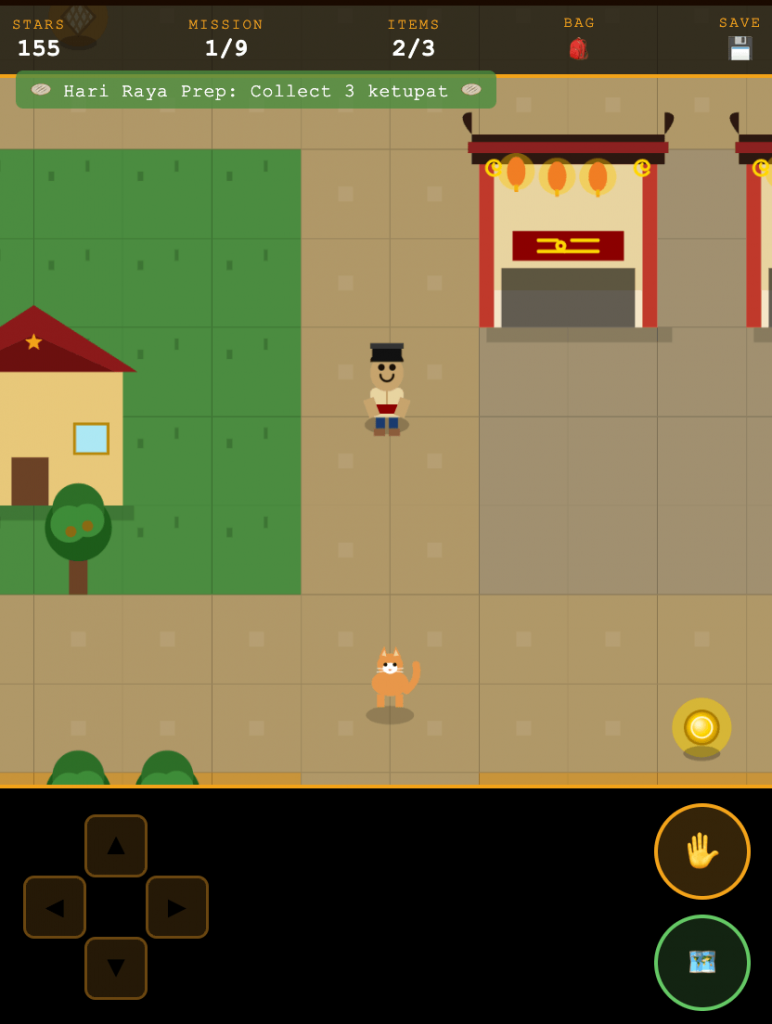
One Malaysia RPG is a browser-based, top-down RPG set across a 1440×1440 world map with Malay, Chinese, and Indian cultural zones — built entirely in one self-contained HTML file, no engine, no npm, no build step. This is the honest account of every decision I made and every bug that nearly broke it.
📋 Table of Contents
- Why Build This at All
- The Concept: A 1Malaysia RPG in the Browser
- Designing the World Map
- Bug #1 — The Blurry Canvas (HiDPI Hell)
- Bug #2 — Emoji Rendering Killed the Game
- Building NPC Dialogue and Enterable Buildings
- Building the Save System with localStorage
- Bug #3 — The Player Got Permanently Stuck
- Bug #4 — The HUD Was Eating All My Clicks
- What I Learned
Why Build This at All
I’d already built AstroHop — a vertical space platformer — as a single-file HTML game, mostly as a challenge to see how much I could pack into one file without a build system. That worked out well enough that I wanted to push further, this time with something culturally personal: a top-down RPG set in Malaysia.
The single-file constraint matters to me. It means the game is genuinely portable — you can drag it to your desktop, email it, put it on a USB drive, open it in any browser on any device, and it just works. No CDN dependencies that disappear, no broken npm installs, no version mismatches. Just one file.
The Concept: A One Malaysia RPG in the Browser
Malaysia is unusually rich material for an RPG world because the culture is genuinely multicultural — Malay, Chinese, and Indian communities co-exist, each with distinct food, architecture, festivals, and traditions. A game that leans into that — rather than just using a generic fantasy setting — felt like something worth making.
The scope I landed on: a top-down 2D RPG with a single continuous world, three cultural zones, enterable buildings, NPC dialogue, a persistent save system, and mobile-first controls. All in one HTML file.
1440×1440 World
A single continuous map large enough to feel explorable, small enough to navigate by hand-coding coordinates.
3 Cultural Zones
Kampung Melayu, Pekan Cina, and Little India — each with distinct NPC characters and building styles.
Enterable Buildings
Walk into a kopitiam or a temple and the view transitions to an interior scene with its own layout and NPCs.
localStorage Save
Your position, visited buildings, and conversation flags persist between browser sessions.
Mobile-First
Large zone-based d-pad for touch, designed so the HUD never accidentally intercepts game-area taps.
Vector NPCs
Hand-drawn humanoid characters with cultural accessories — no emoji, no sprites, pure canvas paths.
Designing the World Map
The world is 1440×1440 pixels of logical canvas space. I chose that number because it’s a clean multiple of common tile sizes and gives enough room for three distinct zones without any one feeling cramped, while keeping the coordinate math simple to hold in your head.
Wooden houses, surau, pasar malam
Meeting point, noticeboard, jalan raya
Shophouses, kopitiam, temple
Textile shops, kovil, banana leaf stalls
Open fields, rubber trees
All zones share one continuous coordinate space. No loading screens between areas.
The camera follows the player and clamps to the world edges. The viewport is the browser canvas, sized to the window. The world itself is never fully rendered — only the tiles and objects within the camera’s view rectangle are drawn each frame. This is basic culling and it was necessary from day one since drawing 1440×1440 of tiles every frame at 60fps on a mobile device would be instant death.
// Camera follows player, clamped so we never show outside the world
function updateCamera() {
  // Centre camera on player
  cam.x = player.x - canvas.width  / 2;
  cam.y = player.y - canvas.height / 2;

  // Clamp so camera never goes outside world bounds
  cam.x = Math.max(0, Math.min(cam.x, WORLD_W - canvas.width));
  cam.y = Math.max(0, Math.min(cam.y, WORLD_H - canvas.height));
}
One thing I got wrong early: I used the canvas CSS dimensions for these calculations instead of the actual pixel dimensions. That caused the camera to drift off-centre on HiDPI displays — which fed directly into the first major bug.
Bug #1 — The Blurry Canvas (HiDPI Hell)
This is the most common canvas gotcha and it still gets me. The browser has two separate size systems for a canvas: the CSS display size (what the element looks like on screen, in CSS pixels) and the actual drawing buffer size (how many real pixels exist in the bitmap). On a Retina display, devicePixelRatio is 2 — meaning one CSS pixel maps to a 2×2 block of real screen pixels. If you don’t account for this, you’re drawing at half the physical resolution and the browser upscales it, which looks blurry.
Set canvas.width and canvas.height to window.innerWidth/Height directly — same as the CSS size. Every device with a pixel ratio above 1 renders blurry.
Multiply the buffer dimensions by devicePixelRatio, set CSS size with style.width/height at the original values, then scale the context by the same ratio before drawing anything.
function setupCanvas() {
  const dpr = window.devicePixelRatio || 1;

  // How big we WANT the canvas to look on screen (CSS pixels)
  const cssW = window.innerWidth;
  const cssH = window.innerHeight;

  // Actual drawing buffer — scaled up by dpr for sharpness
  canvas.width  = cssW * dpr;
  canvas.height = cssH * dpr;

  // Keep the visual CSS size unchanged
  canvas.style.width  = cssW + 'px';
  canvas.style.height = cssH + 'px';

  // Scale drawing context so all coordinates are in CSS pixels
  // (no need to multiply every single draw call by dpr manually)
  ctx.scale(dpr, dpr);

  // Store CSS dimensions for gameplay (camera, collision, tap detection)
  viewport.w = cssW;
  viewport.h = cssH;
}ctx.scale(dpr, dpr), you must use CSS pixel coordinates for all gameplay math — player position, tile rendering, collision detection, tap/click position conversion. The context scale handles the rest. If you mix raw pixel coordinates with CSS pixel coordinates anywhere in your game loop, you get incorrect collision and interaction zones.Bug #2 — Emoji Rendering Killed the Game
I’d started by drawing NPCs and decorative objects as emoji using ctx.fillText(). It seemed like a shortcut at the time — a Malay grandma character is just 👵, a Chinese shopkeeper is 🧑🍳, easy. The problem is that emoji rendering in a canvas context is completely platform-dependent. The browser uses the OS emoji font, and every OS has a different one. They differ in size, baseline alignment, color rendering, and fallback behavior. There is no way to normalize this across platforms.
The fix was to throw out every emoji and replace them with hand-drawn canvas vector graphics. This sounds like a lot more work — and it is — but it has a real upside: your characters look exactly the same on every device, you control every pixel, and you can add cultural accessories that no emoji font would ever include.
// A simple humanoid character drawn entirely with canvas arcs and rects.
// x, y = feet position. All measurements relative to character height.
function drawCharacter(ctx, x, y, opts = {}) {
  const {
    skinTone = '#c68642',
    shirtColor = '#3ecfff',
    pantColor = '#2d3a5e',
    accessory = null,   // 'songkok' | 'kebaya-headscarf' | 'bindi'
    scale = 1
  } = opts;

  ctx.save();
  ctx.translate(x, y);
  ctx.scale(scale, scale);

  // Legs
  ctx.fillStyle = pantColor;
  ctx.fillRect(-7, -20, 6, 20);
  ctx.fillRect(1, -20, 6, 20);

  // Body / shirt
  ctx.fillStyle = shirtColor;
  ctx.fillRect(-9, -40, 18, 22);

  // Head
  ctx.fillStyle = skinTone;
  ctx.beginPath();
  ctx.arc(0, -52, 12, 0, Math.PI * 2);
  ctx.fill();

  // Accessory
  if (accessory === 'songkok') drawSongkok(ctx);
  if (accessory === 'bindi')   drawBindi(ctx);

  ctx.restore();
}

// Draw a songkok (Malay traditional cap) on the character's head
function drawSongkok(ctx) {
  ctx.fillStyle = '#1a1a2e';
  ctx.fillRect(-13, -67, 26, 8);  // brim
  ctx.fillRect(-10, -78, 20, 12); // crown
}Building NPC Dialogue and Enterable Buildings
The dialogue system ended up being simpler than I expected. Each NPC has an id, a position, and an array of dialogue strings. When the player is within interaction range and presses the action button (or taps the NPC zone on mobile), a state flag flips and the dialogue box renders over the game canvas.
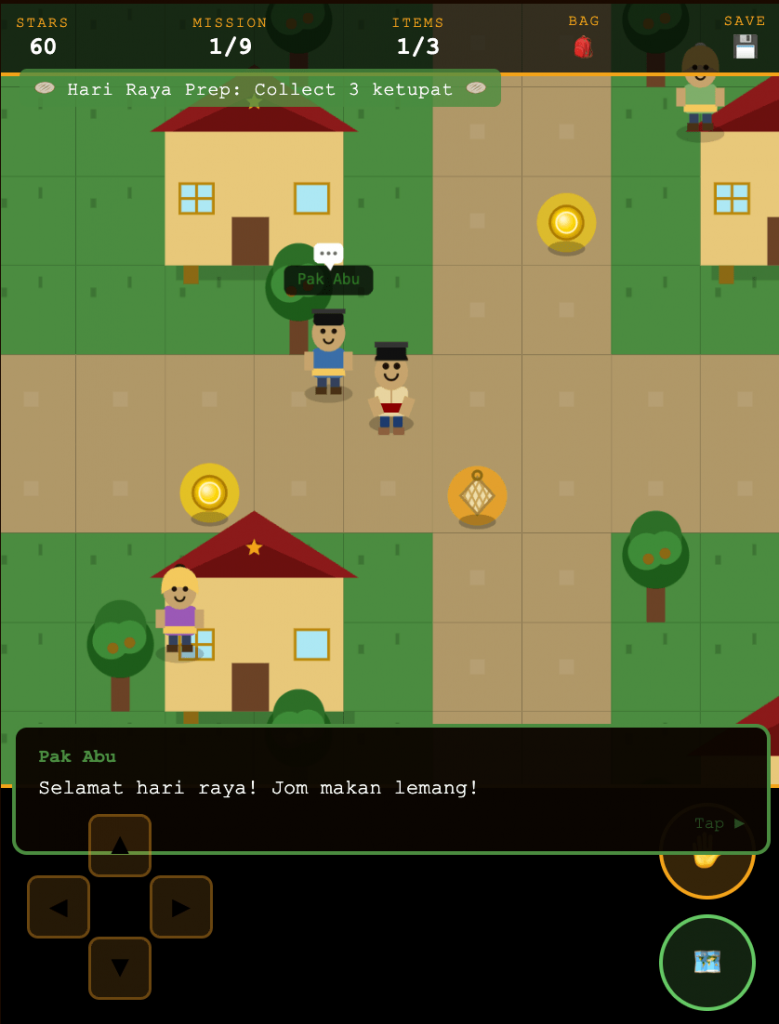
The building interiors were more interesting. An “enterable building” is just a zone rectangle in world space. When the player walks into it, the game switches to a different scene — a hand-drawn interior with its own floor tiles, furniture, and NPCs. The interior scene renders in exactly the same way as the world scene; the only difference is which tilemap and NPC array are active.
// Each building entry zone stores where to put the player on entry and exit
const BUILDINGS = [
  {
    id: 'kopitiam',
    label: 'Old Town Kopitiam',
    // Rectangle in WORLD space that triggers entry
    worldZone: { x: 820, y: 340, w: 48, h: 12 },
    // Where the player appears inside the building
    entryPos:  { x: 200, y: 320 },
    // Where the player appears back in the world on exit
    exitPos:   { x: 820, y: 360 },
    scene: 'interior-kopitiam'
  },
  // ... more buildings
];

function checkBuildingEntry() {
  for (const b of BUILDINGS) {
    if (overlaps(player, b.worldZone)) {
      activeScene  = b.scene;
      player.x     = b.entryPos.x;
      player.y     = b.entryPos.y;
      currentBuilding = b;
      return;
    }
  }
}
Building the Save System with localStorage
The save system serialises a small state object into localStorage. It stores the player’s world position, the active scene, a set of visited building IDs, and a set of completed dialogue flags. On load, it reads this back and restores from it — or starts a fresh game if nothing is saved.
const SAVE_KEY = 'budakkampung_save';

function saveGame() {
  const state = {
    playerX:      player.x,
    playerY:      player.y,
    scene:        activeScene,
    visitedBuildings: [...visitedBuildings],  // Set → Array for JSON
    completedDialogue: [...completedDialogue],
    savedAt: Date.now()
  };
  localStorage.setItem(SAVE_KEY, JSON.stringify(state));
}

function loadGame() {
  const raw = localStorage.getItem(SAVE_KEY);
  if (!raw) return false; // no save found → fresh start

  try {
    const s = JSON.parse(raw);
    player.x          = s.playerX;
    player.y          = s.playerY;
    activeScene       = s.scene;
    visitedBuildings  = new Set(s.visitedBuildings);
    completedDialogue = new Set(s.completedDialogue);
    return true;
  } catch (e) {
    // Corrupted save — don't crash, just start fresh
    localStorage.removeItem(SAVE_KEY);
    return false;
  }
}try/catch around JSON.parse() is not optional. localStorage can return corrupted data if the user’s storage is full, if they’ve manually edited the value, or if a previous version of the game wrote a different format. Crashing on load is the worst possible user experience — silently starting fresh is always better.Bug #3 — The Player Got Permanently Stuck
checkBuildingEntry() (which fires on every frame), but inside an interior scene, none of the building zones were in range. The player was stuck, the exit door did nothing, and there was no way out except deleting the save.The root cause was a logic error: I had a single function that handled both entering a building from the world and exiting a building back to the world, but the exit detection only worked if you were touching the world-space entry zone — which is meaningless when you’re already inside the building.
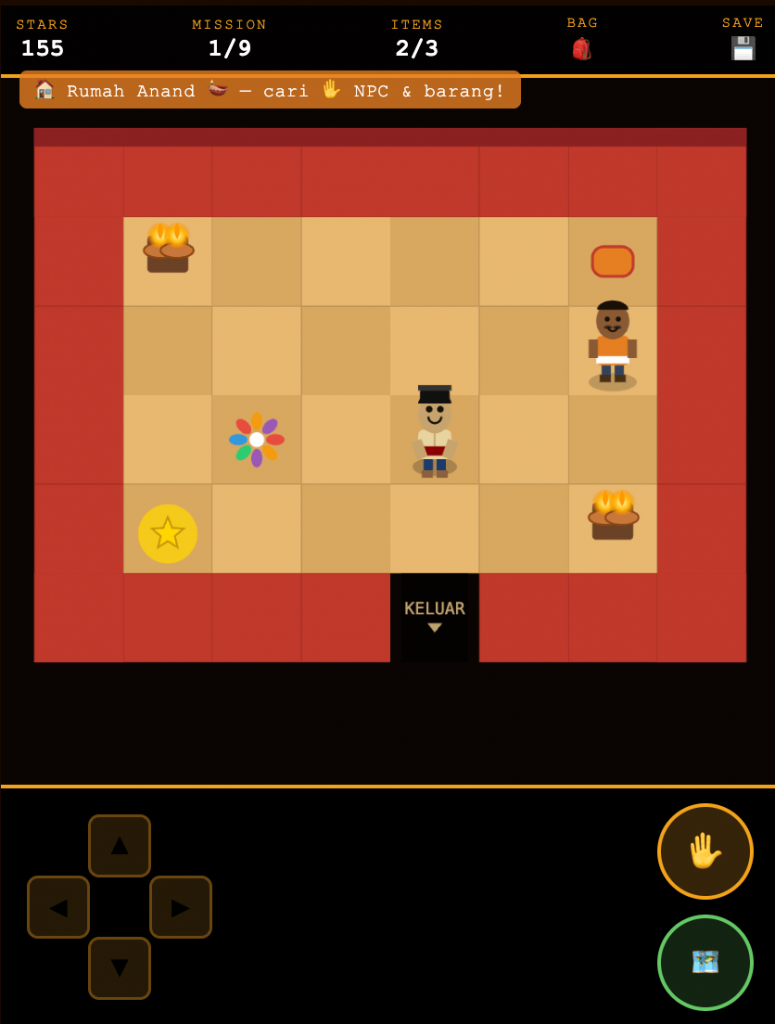
One checkBuildingEntry() function that looped over world-space zones on every frame, regardless of whether the player was in a world scene or an interior scene.
Split into checkBuildingEntry() (only called in world scenes) and checkBuildingExit() (only called in interior scenes, checking against interior-specific exit zones). Scene type determines which function runs.
// Each interior scene defines its own exit zone (in INTERIOR space)
const INTERIOR_EXITS = {
  'interior-kopitiam': { x: 180, y: 360, w: 60, h: 20 },
  // ... one per interior
};

function gameTick() {
  if (activeScene === 'world') {
    checkBuildingEntry(); // detect walking INTO a building
  } else {
    checkBuildingExit();  // detect walking OUT of a building
  }
}

function checkBuildingExit() {
  const exitZone = INTERIOR_EXITS[activeScene];
  if (!exitZone) return;

  if (overlaps(player, exitZone)) {
    player.x     = currentBuilding.exitPos.x;
    player.y     = currentBuilding.exitPos.y;
    activeScene  = 'world';
    currentBuilding = null;
  }
}
Bug #4 — The HUD Was Eating All My Clicks
The HUD is an absolutely-positioned <div> layered over the canvas. The Save and Bag buttons are inside it. The problem: the HUD <div> itself was spanning the entire screen height, even though the buttons were only in the bottom corners. The transparent HUD container was intercepting all pointer events in its area — including taps intended for the canvas below it.
/* The HUD container spans the full screen but should not
   intercept pointer events — only its children (the actual
   buttons) should be interactive. */
#hud {
  position: absolute;
  inset: 0;
  z-index: 10;
  pointer-events: none;  /* ← the fix: container is click-through */
}

/* Re-enable pointer events only on the actual HUD buttons */
#hud button,
#hud .dpad-zone {
  pointer-events: auto;
}pointer-events: none on the container plus pointer-events: auto on the interactive children is the standard pattern for any overlay UI that needs to sit above a canvas without blocking interaction with the canvas itself. It’s a one-liner fix, but the bug it prevents is genuinely confusing to debug because the element isn’t visually blocking anything — it’s just intercepting pointer events invisibly.What I Learned
| Problem | Lesson |
|---|---|
| HiDPI blurriness | Always multiply canvas buffer dimensions by devicePixelRatio. Do it first. Retrofitting it later means auditing every single coordinate in the codebase. |
| Emoji inconsistency | Never use ctx.fillText() with emoji for anything that needs to look consistent. Canvas vector paths give you full control and look identical everywhere. |
| Player stuck in building | Scene-awareness matters. Functions that check world state should know which scene is active and opt out if they don’t apply. One generic update function leads to logic bugs that only surface in edge-case save states. |
| HUD swallowing touches | pointer-events: none on overlay containers is the correct solution. The UI container should never receive pointer events — only its actual interactive children should. |
| Save corruption | Always wrap JSON.parse() in a try/catch. A crash on load is unforgivable. Silently starting a new game is always the right fallback. |
| Building entry/exit | Keep entry and exit logic in separate, clearly named functions. Don’t try to make one function handle both directions of a transition — the conditions for each are different enough that a unified function just accumulates edge cases. |
The single-file constraint forced me to think carefully about scope. There’s no build step to fall back on, no module system to hide complexity in, no way to quietly add a dependency when something gets hard. Every feature has to justify its weight in the same file where everything else lives. That pressure produces surprisingly clean code.
Budak Kampung isn’t a technically impressive game — no shader effects, no physics engine, no procedural generation. But it works, it plays identically on every device, it has zero dependencies, and it’s one file you can open anywhere. For a side project that started as “can I build an RPG in pure HTML?”, that feels like success.
The Bugs Were the Tutorial
Every broken thing in this project taught me something I wouldn’t have learned from a tutorial that worked first time:
- HiDPI setup: do it before writing a single draw call, not after you notice blurriness
- Emoji on canvas: the answer is always “draw it yourself with paths”
- Scene-aware logic: functions should know which scene is active and be silent when they don’t apply
- Overlay pointer events:
pointer-events: noneon the container,autoon the children - localStorage: always guard with try/catch, always fail gracefully to a new game
- Scope discipline: the single-file constraint is a feature, not a limitation — it forces you to fight for every line of code you add
The game is playable in any browser. No install, no account, no loading screen. Just a file.