
Usually, web designer will create animation using language like JavaScript, but now, web designer can create smooth, maintainable animation more easily using CSS3 Animation & Keyframe. The syntax of CSS3 Animation & Keyframe is extremely easy to understand, and don’t requires any programming knowledge. In this tutorial, we will cover the syntax of CSS3 Animation & Keyframe; and we will create a simple spinning newspaper using the syntax that we have learned. Please check out the demo, before we start the tutorial.
The Syntax of CSS3 Animation
There are six properties available for the CSS3 Animation properties.
- animation-name – This property is used to specify name of the keyframe that you are going to use. You can put any name as you like.
- animation-duration – Specifies the time (in milliseconds format) an animation takes to complete.
- animation-timing-function – Specifies the speed curve of the animation
- animation-delay – Specifies the time for before an animation will start.
- animation-iteration-count – Specifies how many times an animation should be played.
- animation-direction – Specifies whether or not the animation should play in reverse.
Setup Essential Elements
Let’s setup the environment by creating a div that contain an image of newspaper:
[html]
<!DOCTYPE html PUBLIC "-//W3C//DTD XHTML 1.0 Transitional//EN" "http://www.w3.org/TR/xhtml1/DTD/xhtml1-transitional.dtd">
<html xmlns="http://www.w3.org/1999/xhtml">
<head>
<meta http-equiv="Content-Type" content="text/html; charset=utf-8" />
<title>Create Stunning Animation Using CSS3 Animation And Keyframe | onlyWebPro</title>
</head>
<body>
<div class="viewport">
<div class="box1"><img src="newspaper.jpg" /></div>
</div>
</body>
</html>
[/html]
There are 3 elements here – viewport, box1 and an image file. Viewport is used to set visibility area of our animation; box1 is the div that hold the newspaper image; image file is the image source of newspaper. Note: You are free to use the following image created by onlyWebPro.com for this tutorial.
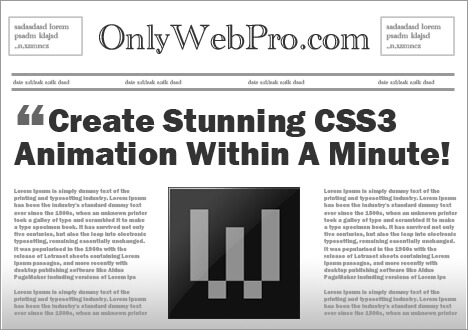
Next, let’s style all the elements using CSS.
[html]
<style>
.viewport {
width: 468px;
height: 330px;
margin: 0 auto;
}
.box1 img {
width:468px;
height:330px;
}
</style>
[/html]
Description:
- viewport – We have set the visibility area to width: 468px, height: 330px and align it to the center of the browser.
- box1 img – We have also set the height and width of the image that same to the viewport. We will animate the newspaper later using these 2 properties.
Creating Animation
It’s time to make the newspaper spinning using the syntax of CSS3 Animation that we have just learned. Specifies the properties of the animation name, duration, timing function, delay, iteration and direction. Note: Firefox requires the prefix -moz-, while Chrome and Safari require the prefix -webkit-.
[html highlight=”23,24-47″]
<!DOCTYPE html PUBLIC "-//W3C//DTD XHTML 1.0 Transitional//EN" "http://www.w3.org/TR/xhtml1/DTD/xhtml1-transitional.dtd">
<html xmlns="http://www.w3.org/1999/xhtml">
<head>
<meta http-equiv="Content-Type" content="text/html; charset=utf-8" />
<title>Create Stunning Animation Using CSS3 Animation And Keyframe | onlyWebPro</title>
<style>
body {
overflow: hidden;
}
.viewport {
width: 468px;
height: 330px;
margin: 0 auto;
}
.box1 img {
width:468px;
height:330px;
background:rgba(255,0,0,0.5);
animation-name: spinning;
-moz-animation-name:spinning;
-webkit-animation-name:spinning;
animation-duration: 1s;
-moz-animation-duration: 1s;
-webkit-animation-duration: 1s;
animation-timing-function: ease;
-moz-animation-timing-function: ease;
-webkit-animation-timing-function: ease;
animation-delay: 0;
-moz-animation-delay: 0;
-webkit-animation-delay: 0;
animation-iteration-count: 1;
-moz-animation-iteration-count: 1;
-webkit-animation-iteration-count: 1;
animation-direction: normal;
-moz-animation-direction: normal;
-webkit-animation-direction: normal;
}
</style>
</head>
<body>
<div class="viewport">
<div class="box1"><img src="newspaper.jpg" /></div>
</div>
</body>
</html>
[/html]
As you can seen from above, we have define an animation called “spinning” with 1 second duration, easing function, no delay, no reverse direction and it won’t repeat. Now, although we already have defined all these animation properties, our animation cannot work yet. We have to apply it using the keyframe rule.
Keyframe Rule
With keyframe rule, we can create animation based on the animation properties that we have just defined. The syntax of keyframe is:
[css]
@keyframes yourAnimationName {keyframes-selector {css-styles;}}
[/css]
- yourAnimationName – The name of the animation that defined in the animation property.
- keyframes-selector – Percentage of the animtion duration. Such as 0%, 25%, 50%, 75%, 100%.
- css-styles – The styles properties.
Ok, let’s apply the animation on our newspaper object:
[css]
<style>
@keyframes spinning
{
0% {width:10px; height: 7px; transform:rotate(0deg);}
100% {width:468px; height: 330px; transform:rotate(1440deg);}
}
</style>
[/css]
At 0% of animation duration, we want the newspaper stay far from us, so we have set its width to 10px, height to 7px and no rotation; When the animation is complete at 100%, then we want the newspaper to stay close to us, so we make it more bigger size and with 1440 degrees of rotation. (Note: we want the newspaper has 4 times of 360 degrees of rotation)
Save your document and view it in supported browser, such as Firefox, Chrome and Safari!
Final Code
[html]
<!DOCTYPE html PUBLIC "-//W3C//DTD XHTML 1.0 Transitional//EN" "http://www.w3.org/TR/xhtml1/DTD/xhtml1-transitional.dtd">
<html xmlns="http://www.w3.org/1999/xhtml">
<head>
<meta http-equiv="Content-Type" content="text/html; charset=utf-8" />
<title>Untitled Document</title>
<style>
.viewport {
width: 468px;
height: 330px;
margin: 0 auto;
}
.box1 img {
width:468px;
height:330px;
background:rgba(255,0,0,0.5);
animation-name: spinning;
-moz-animation-name:spinning;
-webkit-animation-name:spinning;
animation-duration: 1s;
-moz-animation-duration: 1s;
-webkit-animation-duration: 1s;
animation-timing-function: ease;
-moz-animation-timing-function: ease;
-webkit-animation-timing-function: ease;
animation-delay: 0;
-moz-animation-delay: 0;
-webkit-animation-delay: 0;
animation-iteration-count: 1;
-moz-animation-iteration-count: 1;
-webkit-animation-iteration-count: 1;
animation-direction: normal;
-moz-animation-direction: normal;
-webkit-animation-direction: normal;
}
@keyframes spinning
{
0% {width:10px; height: 7px; transform:rotate(0deg);}
100% {width:468px; height: 330px; transform:rotate(1440deg);}
}
@-moz-keyframes spinning /* Firefox */
{
0% {width:10px; height: 7px; -moz-transform:rotate(0deg);}
100% {width:468px; height: 330px; -moz-transform:rotate(1440deg);}
}
@-webkit-keyframes spinning /* Safari and Chrome */
{
0% {width:10px; height: 7px; -webkit-transform:rotate(0deg);}
100% {width:468px; height: 330px; -webkit-transform:rotate(1440deg);}
}
</style>
</head>
<body>
<div class="viewport">
<div class="box1"><img src="newspaper.jpg" /></div>
</div>
</body>
</html>
[/html]